

Running a WordPress site in 2025 shouldn’t feel like juggling chainsaws. Yet, many site owners still find themselves drowning in repetitive tasks: publishing posts manually, responding to customer reviews one by one, updating product prices across hundreds of WooCommerce items, sending follow-up emails after every order, or even generating meta descriptions and SEO tags by hand.
You’ve probably heard about workflow automation. And you’ve likely tried Zapier, seen ads for Make, maybe even looked into N8N. They all promise “set it and forget it.” But in reality, most of them add friction not freedom especially if your world lives inside WordPress.
That’s because they weren’t built for WordPress. They were built for the generic cloud connecting SaaS tools in a world that assumes your data belongs to someone else.
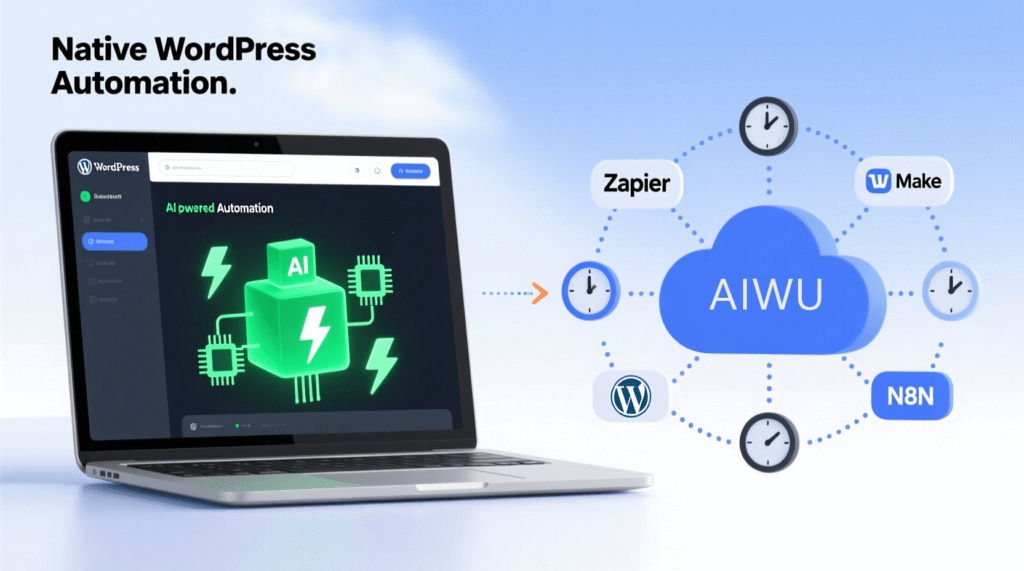
But what if there was a workflow builder that truly understands WordPress the way WordPress understands itself?
Now, there’s a better way: AIWU Workflow Builder. Not a plugin bolted on. Not an external service polling your site every 15 minutes. But a native WordPress brain living inside your dashboard, running on your server, triggering instantly the moment something happens.
In this deep-dive comparison, we’ll go beyond marketing fluff and look at what really matters: speed, cost, privacy, ease of use, AI integration, and whether the tool actually solves your problem not just moves it elsewhere.
Why “Cloud-First” Workflow Tools Struggle with WordPress
Before we talk about AIWU, let’s be fair: Zapier, Make, and N8N are powerful. But they treat WordPress like any other API endpoint which it isn’t.
WordPress is event-driven. When a user registers, a hook fires. When an order is placed, a status changes. These aren’t “data exports” they’re real-time signals your site already knows how to handle.
Yet Zapier checks for new posts every 15 minutes on its cheapest plan. Make and N8N can do better with webhooks but even then, you’re managing REST API permissions, authentication tokens, and debugging failed webhooks. Worse, your data leaves your server entirely, passing through third-party clouds. That’s not just a performance bottleneck; it’s a compliance risk under GDPR, CCPA, or HIPAA.
For many site owners, this trade-off feels unavoidable. But it’s not.
AIWU Workflow Builder: WordPress Automation, Reimagined
Launched in October 2025 as part of AIWU plugin v1.4.0, the Workflow Builder isn’t just another automation tool it’s a philosophical shift.
Instead of forcing WordPress to talk to the outside world, AIWU brings automation home into the WordPress ecosystem itself.
Because it runs as a WordPress plugin, AIWU taps directly into WordPress hooks like wp_insert_post or woocommerce_order_status_changed. There’s no polling, no webhooks, and no delays. When a customer places an order at 3:07 AM, the thank-you email sends at 3:07:02 AM not 15 minutes later. That’s not just faster; it’s better customer experience.
And because it’s built inside WordPress, AIWU understands WordPress deeply. It knows the difference between a draft and a scheduled post. It handles WooCommerce order statuses, product variations, and review metadata natively. You can loop through all products in an order, update custom fields, taxonomies, and even featured images without writing a single line of code. Compare that to Zapier, where updating a post’s featured image requires a custom REST API call, proper authentication, and JSON formatting. With AIWU? You select “Update Post” → “Set Featured Image” → choose from your media library or generate one with AI. Done.
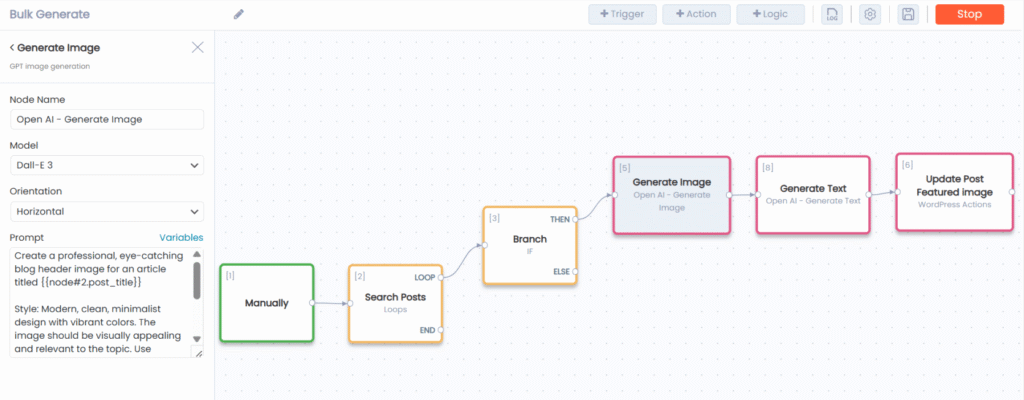
This isn’t just convenience it’s accessibility. Non-developers can build powerful automations without fear of breaking their site.
AI Isn’t an Add-On It’s the Core
Here’s where AIWU truly separates itself: AI is built into the workflow engine, not tacked on as a beta feature. It supports five major providers OpenAI, Anthropic’s Claude, Google’s Gemini, DeepSeek, and Perplexity with smart, controlled interactions.
You can write dynamic prompts using live WordPress data: “Write a 300-word product description for {{product_name}} in the {{category}} category.” You can enforce token limits per workflow to prevent bill shock. You can generate AI images via DALL·E or Gemini, and AIWU will auto-upload them to your media library and attach them to posts. You can even chain AI steps: generate a topic, write an article, create an image, and schedule it all in one workflow.
For content creators, affiliate marketers, or WooCommerce stores, this is transformative. One user automated the creation of 500 SEO-optimized blog posts in 30 days using a single AIWU workflow. Total cost? Roughly $200 in OpenAI fees versus an estimated $25,000 for freelancers. That’s not efficiency. That’s leverage.
The Real Cost Advantage: AIWU Saves Real Money
Let’s talk numbers because automation shouldn’t bankrupt you.
AIWU’s free tier includes all 41 automation blocks and unlimited executions. You only pay for your AI API usage (which you’d pay anyway, regardless of platform). Zapier and Make, by contrast, bill you per execution. A 5-step order workflow equals five charges per order. At 1,000 orders per month, you’re suddenly in the $49–$299/month range. With AIWU? Still $0 for the automation layer.
Most medium-sized WooCommerce stores can run their core automation entirely on the free version – thanks to AIWU’s 3-workflow limit covering typical needs like order processing, AI content generation, and customer notifications.
Only if you truly need 15+ separate workflows (e.g., one per product category, or per marketing channel) would you need the $89 lifetime PRO license. In that case, your first-year cost is ~$449 ($89 + $360 AI API), still beating Zapier Pro ($588+) and Make Pro ($550+).
And from year two onward? You pay only for AI—because your automation license is already yours forever.
Don’t forget: Zapier and Make workflows often depend on paid “glue” services like Airtable ($12+/mo) or Google Workspace to store state or history. N8N users frequently add Redis, Postgres, or Pinecone for advanced use cases. AIWU needs none of that — it uses your existing WordPress data layer, so $0 in hidden add-ons.
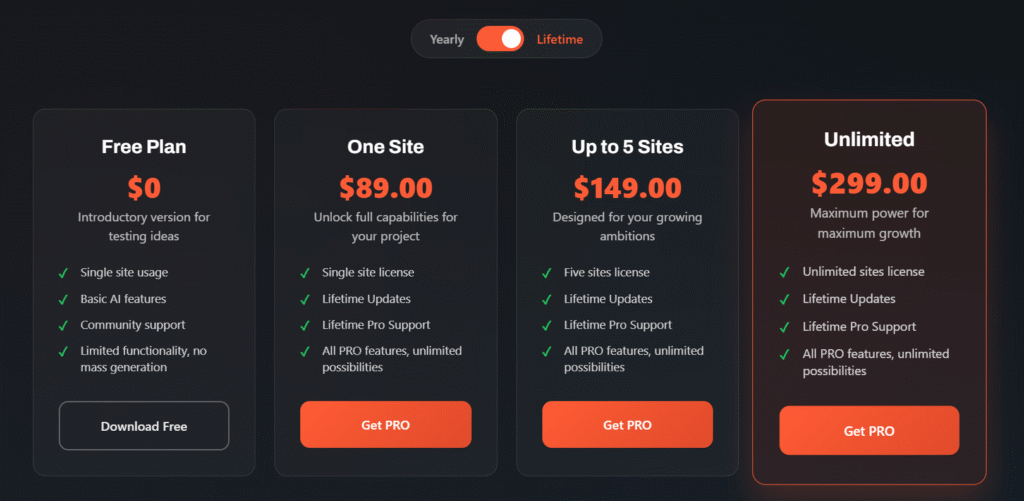
The savings compound quickly not just in dollars, but in time spent managing accounts, tracking usage, and hunting down failed webhooks.
Privacy by Design: Your Data Never Leaves Home
In a world of data breaches and tightening regulations, this matters more than ever. AIWU runs entirely on your server. No data leaves your WordPress database unless you explicitly send it to an AI provider and even then, only the prompt and response transit externally, not your customer data.
Zapier and Make process everything through their cloud infrastructure. Every order ID, user email, and draft post flows through their servers even briefly. For EU-based sites, healthcare blogs, or any business handling sensitive info, AIWU’s architecture is a GDPR-friendly default, not an expensive add-on.
When AIWU Isn’t the Right Choice (And That’s Okay)
Let’s be honest: AIWU doesn’t connect to Slack, Salesforce, or Google Sheets (for now, at least, the integration of external services is in progress.). It’s WordPress-first. If your business depends on syncing WordPress data to 10 external tools, you’ll still need Zapier or Make for those specific connections.
But here’s the smart strategy most savvy users adopt: use AIWU for everything WordPress-native (which covers 80–100% of workflows for many sites), and keep Zapier or Make only for the 1–2 external integrations you truly need. One WooCommerce store reduced its Zapier bill from $49 to $19.99/month by moving 12 of 15 workflows to AIWU. Another blogger eliminated Zapier entirely saving $240/year because all their automation happened inside WordPress.
Real Use Cases Where AIWU Shines
Imagine auto-generating product descriptions the moment someone buys an item without one. With AIWU, a new order triggers a loop through each product, filters for missing descriptions, sends the product name to GPT-4, and instantly updates the product all without leaving your site.
Or consider a weekly content engine: every Monday at 9 AM, AIWU generates five blog ideas, writes full 1,500-word posts, creates SEO meta descriptions, generates featured images with DALL·E, and schedules them for publication over the next week. All on the free plan.
For customer support, when a new order note arrives, AI analyzes urgency (“urgent,” “normal,” “faq”), routes it to a team member or auto-responds, and updates the order status accordingly reducing support tickets by 40% in early user tests.
What About the Alternatives?
Zapier remains the go-to for connecting dozens of SaaS tools. With 7,000+ integrations, it’s unmatched for linking WordPress to CRMs, email platforms, or social media. But it’s expensive, slow for WordPress-native tasks, and charges per execution. It’s ideal if your business lives across many external apps but overkill if your world is WordPress.
Make strikes a middle ground. It offers powerful visual workflows and better pricing than Zapier, with instant webhook support. But it still runs in the cloud, requires per-operation billing, and lacks native AI integration. It’s great for complex data flows but demands a steeper learning curve.
N8N is the developer’s choice. Self-hosted and open-source, it gives total control and unlimited executions for the cost of a VPS. But it requires Node.js knowledge, server maintenance, and manual API setup. If you have DevOps resources and need compliance or scale, it’s brilliant. Otherwise, it’s overengineering for most WordPress users.
The Bottom Line: Who Should Choose AIWU?
AIWU is perfect if you run a WordPress blog, WooCommerce store, or affiliate site. If you want AI to do the heavy work not just assist. If you need automation that’s instant, free, and private. If you prefer a visual, no-code builder that respects WordPress. And if you’re tired of paying $20–$600/month for tasks your site could handle itself.
It’s not for you if your primary need is connecting WordPress to dozens of external SaaS tools. But even then consider a hybrid setup. Use AIWU for the heavy lifting inside WordPress, and Zapier only for the 1–2 external connections you truly need.
Ready to Try the Future of WordPress Automation?
AIWU Workflow Builder is free on WordPress.org with all 41 blocks, AI support, and unlimited executions. No trial. No credit card. No tricks.
You’ll be automating your WordPress site easily and saving hundreds (or thousands) of dollars a year.
Because in 2025, your automation shouldn’t live in the cloud.
It should live where your site lives – in WordPress!