❄️ Winter Sale: 40% OFF AIWU
WINTER_SECRET
Valid until Mar 1st
Auto-Forward Product Photos to Multiple Telegram Channels - AIWU – AI Plugin for WordPress

Auto-Forward Product Photos to Multiple Telegram Channels

Content Easy

Automatically send product photos to multiple Telegram channels on a schedule. The first channel receives the photo by URL, and the second channel receives it using the Telegram File ID from the first send — saving bandwidth and improving speed.
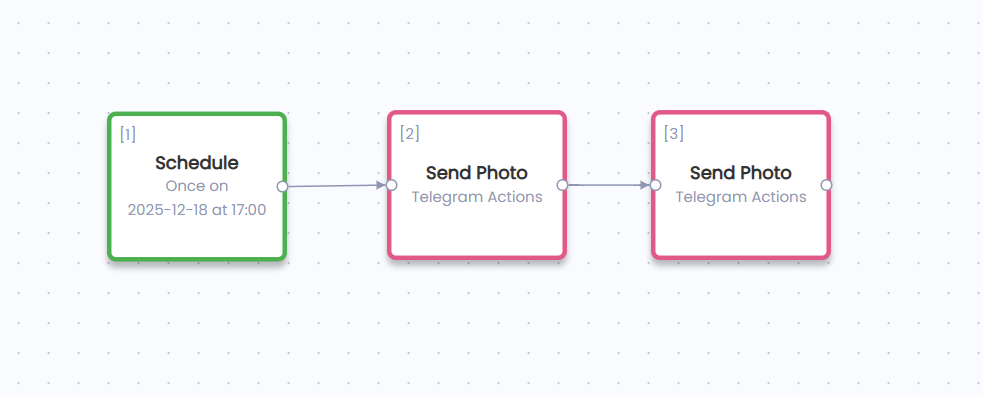
Auto-Forward Product Photos to Multiple Telegram Channels workflow template preview

📋 How to Build This Workflow

1

Set Up the Trigger

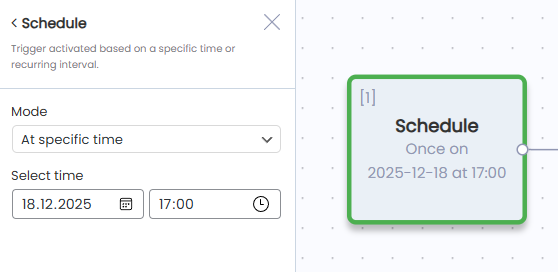
Add a Schedule trigger to run the workflow automatically. Configure the schedule based on how often you want to post (e.g., daily, every 12 hours, etc.).
2

Send Photo to First Channel (by URL)

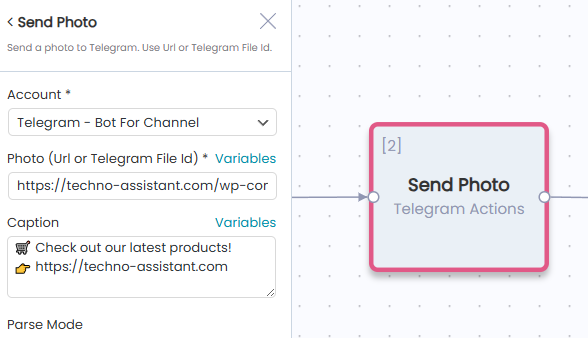
Add a Send Photo action from Telegram Actions. Configuration: - Account — Select your Telegram bot connected to the first channel (e.g., "Techno Assistant - Main"). - Photo (Url or file_id) — Enter the direct URL of the product image (e.g., https://your-store.com/wp-content/uploads/product-image.jpg). - Caption — Add a caption with a link to your store: 🛒 Check out our latest products! 👉 https://techno-assistant.com
3

Send Photo to Second Channel (by File ID)

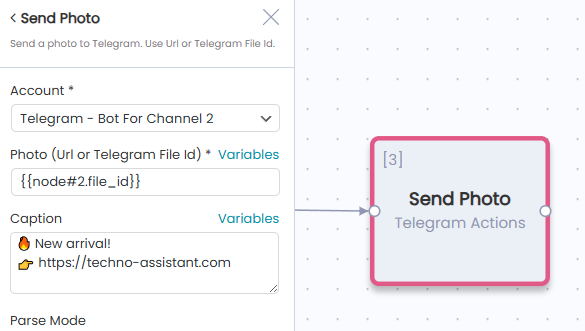
Add another Send Photo action from Telegram Actions. Configuration: Account — Select your Telegram bot connected to the second channel (e.g., "Techno Assistant - Deals"). Photo (Url or file_id) — Click Variables and insert the file_id from the previous node: {{node#2.file_id}} Caption — Use the same or different caption: 🔥 New arrival! 👉 https://techno-assistant.com

💡 Pro Tips

  • Use direct image URLs. Make sure the URL points directly to the image file (ending in .jpg, .png, etc.), not to a webpage.
  • Caption limit. Telegram allows up to 1024 characters in photo captions.
  • Test first. Run the workflow manually once to verify photos are delivered correctly before enabling the schedule.
  • Multiple channels, same bot. If both channels are managed by the same bot, using file_id for the second channel is the most efficient approach.

Ready to Build This Workflow?

AIWU Workflow Builder lets you recreate this template in minutes without writing code. Free visual automation tool that runs directly on your WordPress site.

Free Forever
No monthly fees, unlimited workflows
Visual Builder
Drag-and-drop, no code needed
🔑
Your API Keys
Use OpenAI, Claude, or any provider
Explore Workflow Builder
Scroll to Top