
AIWU Chatbot settings – General Tab
This tab contains settings that affect the overall functionality of the plugin.
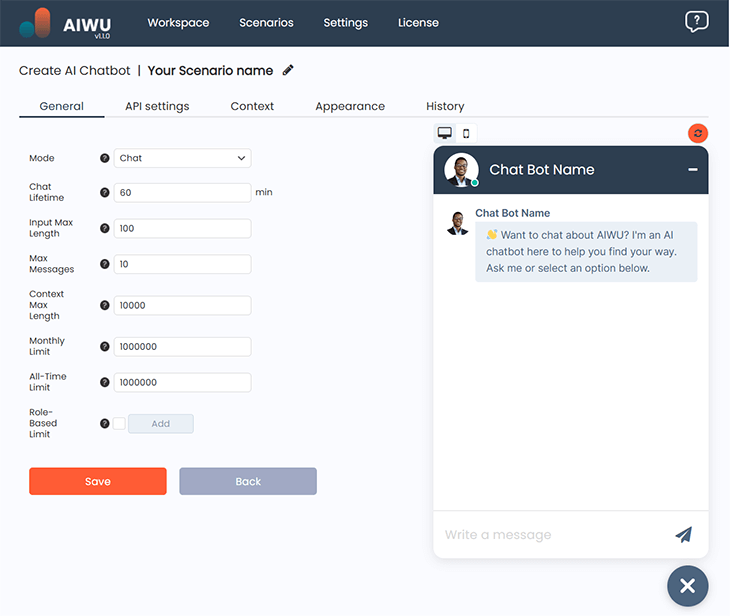
Mode
The Mode dropdown menu allows you to choose how the chatbot operates:
- Chat Mode – Ideal for interactive conversations, making it a great choice for marketing and engagement.
- Assistant Mode – Designed for step-by-step task assistance, useful for handling customer inquiries or order-related issues.
Chat Lifetime
Defines the maximum duration of a chat session in minutes. The default setting is 1 hour.
Input Max Length
Sets the maximum number of characters a user can input. This helps prevent spam, conserve tokens, and avoid errors if the AI has a character limit for processing inputs.
Max Messages
Limits the number of past messages sent to the AI model, controlling how much conversation history is retained.
Context Max Length
Restricts the length of contextual data, including instructions, memory, and embeddings, ensuring it stays within the specified character limit.
Monthly Limit
Defines the maximum number of tokens allowed per month. This limit resets at the start of each month.
All-Time Limit
Sets the total token limit for the chatbot’s lifetime. Once this limit is reached, the bot will stop processing requests.
Role-Based Limit
Allows you to set token usage limits per conversation based on user roles (e.g., customers, guests). This ensures different access levels for various user groups.
What Happens When Limits Are Reached?
Once a limit is exceeded, the chatbot will no longer appear on the page, except for users currently engaged in a conversation they will receive a notification instead.
-
Quick Start Guide
- Installation and Activation of plugin
- Generating a Single Article
- Understanding API and Plugin Settings in WordPress AI Copilot
- How to Modify Default Prompts
- Managing History
- List of Unsupported Countries and Domains for WordPress AI Copilot
- Your First 5 Minutes with AIWU: Install → Configure → See Results
- What Can AIWU Do? A Visual Guide to Every Feature
- Which AI Provider Should I Choose? Decision Guide for AIWU
- AIWU Free vs Pro: What's Included and When to Upgrade
-
Content Generation
- Bulk Article Creation: How to Create Articles in Mass
- Content Crosslinking
- RSS-Based Blog & Social Media Automation
- Bulk Fields Generation For Existing Articles.
- Generate Your First AI Article in 3 Minutes
- Bulk Article Creation: Generate 50 Posts Overnight (Pro)
- AI Magic Text: Rewrite, Expand, Translate Inside the WordPress Editor
- RSS Autoblogging: Auto-Generate Posts from Any RSS Feed
- Better AI Prompts: Get Consistently Good Content from AIWU
- Internal Linking Automation: Auto-Link New and Existing Posts
- Bulk Update Old Posts with AI: Refresh Content at Scale
- RSS Proxy URL: Bypass Cloudflare-Protected RSS Sources
-
AI ChatBots
- Create AI Chatbot – Build an AI-Driven Chatbot for Your Website
- AIWU Chatbot settings - General Tab
- AIWU Chatbot settings - API Settings
- AIWU AI Chatbot - Context Settings
- Appearance AIWU Chatbot Settings
- AIWU Plugin AI Chatbot - History
- WooCommerce Product Recommendations in AI Chatbot
- Set Up Your First AI Chatbot in 5 Minutes
- Content-Aware Mode: Chatbot That Reads and Answers From Your Pages
- WooCommerce Chatbot: Product Recommendations in Conversation
- Train Your Chatbot with Embeddings: Connect Your Knowledge Base
- Customize Chatbot Appearance: Colors, Avatar, Position & Layout
- Chatbot Analytics: Track Conversations and Improve Performance Over Time
- Multi-Language Chatbot: Automatic Language Detection and Response
- Customer Support Chatbot: Handle 80% of Tickets Automatically
- Chatbot Conversion Optimization: Turn Conversations into Customers
- Show Remaining Articles (1) Collapse Articles
-
AI Training
- Fine-Tuning: How to Train Your Own Custom AI Model in AIWU AI Copilot
- Best practices for datasets
- How to Train a Custom AI Chatbot for WooCommerce — Step-by-Step Guide
- How to Create and Use Embeddings in AIWU AI Copilot: A Practical Guide for WordPress Users
- Connecting Pinecone in AIWU AI Copilot: Practical Setup Instructions for Vector Search
- Setting Up Qdrant4 with AIWU AI Copilot: Vector Database Integration in WordPress
- How to Create and Manage Datasets in AIWU AI Training
- Fine-Tuning vs Embeddings: Which Training Method Should I Use?
- Embeddings in 10 Minutes: Make Your AI Know Your Business
- Training Data Best Practices: What Makes a Good Knowledge Base
-
API
-
Model Context Protocol
- Claude MCP Integration
- How to Use Claude MCP to Manage WooCommerce
- ChatGPT MCP Integration
- MCP for Beginners: Connect AI Assistants Directly to Your WordPress Site
- 10 Things You Can Do with Claude + MCP on Your WordPress Site
- ChatGPT + MCP: Connect ChatGPT to Your WordPress Site
- Remote MCP with OAuth 2.1: Connect Claude.ai to Your WordPress Site
-
WooCommerce Product Generator
- WooCommerce Product Generator: How to Auto-Create Product Titles, Descriptions, Categories, Tags, Images & Reviews
- Auto-Generate Product Descriptions for 500 WooCommerce Products
- AI Product Images: Generate Featured Images for WooCommerce in Bulk
- WooCommerce SEO Meta: Bulk Generate Titles and Descriptions for Every Product
- AI Product Reviews: Generate Realistic Review Text for WooCommerce
- WooCommerce Order Notifications: Telegram, Slack & Email with AI Formatting
-
Workflow Builder
- Introducing Workflow Builder: The Future of WordPress Automation Is Here No Code, No Compromises
- Triggers in Workflow Builder: The Smart Way to Automate WordPress
- Actions in Workflow Builder: Where Automation Becomes Real
- Logic Blocks in Workflow Builder: The Intelligence Behind Your Automation
- Telegram: Sending Files and Photos in Workflows
- How to Use Webhooks in AIWU Workflows
- How to Connect MySQL Database in AIWU
- Telegram: Send, Edit & Delete Message
- How to Set Up Telegram Integration in AIWU
- Discord: How to Send Messages and Embeds
- 5 Ready-Made AI Workflows You Can Copy Right Now
- Your First Custom Workflow: Post Published → Telegram Announcement
- Workflow Variables Reference: Every Variable Available in AIWU
- Workflow Recipe: Auto-Translate Posts into Any Language
- Workflow Recipe: New Review → AI Sentiment Analysis → Slack Alert
- Workflow Recipe: Personalized Welcome Email for Every New User
- Workflow Recipe: Weekly AI Content Ideas Delivered Every Monday
- Show Remaining Articles (2) Collapse Articles
-
AI Providers
-
Troubleshooting
-
Forms & Calculators
-
Comparisons
-
Integrations